 Aidan Holt
Free guide · No signup
How I vibe coded my TV with Claude
The exact prompts, step by step. Copy, paste, done. Kill the home-screen ads, get YouTube with no ads, and build an Apple TV style home screen on a Fire TV.
Before and after, measured on my TV
| Ads on the home screen | 7 | 0 |
| Dropped frames when scrolling | 81% | ~25% |
| YouTube pre-roll and mid-roll ads | Yes | None |
| Amazon extras switched on | 10 | 0 |
Honest part: this removes home-screen ads. Ads inside Prime Video or Netflix ad tiers stay. Free memory barely changed.
What you need
- A Fire TV stick or Fire TV. Android TV and Google TV work the same way.
- A Mac or PC on the same Wi-Fi.
- Claude Code (comes with a paid Claude plan). Open the Terminal and type
claude.
01
Turn on developer mode on the TV
- On the TV: Settings > My Fire TV > About.
- Highlight your device name (the first line) and press OK on the remote 7 times until it says you're a developer.
- Go back one screen, open Developer Options and turn on ADB debugging.
- In About > Network, write down the IP address (looks like 192.168.1.23).
02
Open Claude Code in a new folder
Paste this in the Terminal. Then paste the prompts below one at a time, in order. Swap anything in [brackets] for your own.
mkdir -p ~/Projects/smart-tv && cd ~/Projects/smart-tv && claude
03
Connect Claude to your TV
Claude installs ADB and connects over Wi-Fi. The TV asks "Allow USB debugging?": tick Always allow, press OK.
I want to vibe code my Fire TV. Help me connect to it over ADB from this computer. Install whatever you need (no installers that need sudo). The TV's IP is [YOUR TV IP] and ADB debugging is on. Connect, then tell me the exact model, Fire OS version, and whether it's 32-bit or 64-bit.
04
Measure the before, and make an undo button
Without a before, you can't prove anything got better. The undo script means you can't break it.
Before we change anything, measure the before: screenshot the home screen, count the ads and promos visible without scrolling, time Netflix and YouTube cold starts, free RAM, and how smooth scrolling is (dumpsys gfxinfo). Save it all in a before/ folder. Then write restore_stock.sh that undoes everything we're about to do.
05
Remove the bloat, YouTube with no ads, AirPlay
Disable, never uninstall, so it stays reversible. SmartTube is what removes YouTube ads.
List the Amazon apps on this TV and tell me which ones are safe to disable. Only disable (pm disable-user), never uninstall, so it's reversible. Show me the list before you run it and save it to debloat_disabled.txt. Then install SmartTube from its official GitHub release, the right build for this TV's CPU. Then open the Amazon Appstore page for AirScreen on the TV so I can press Get for AirPlay from my iPhone.
06
Build the Apple TV style home screen
Swap the apps in brackets for yours. Claude shows you a preview on your computer before it touches the TV.
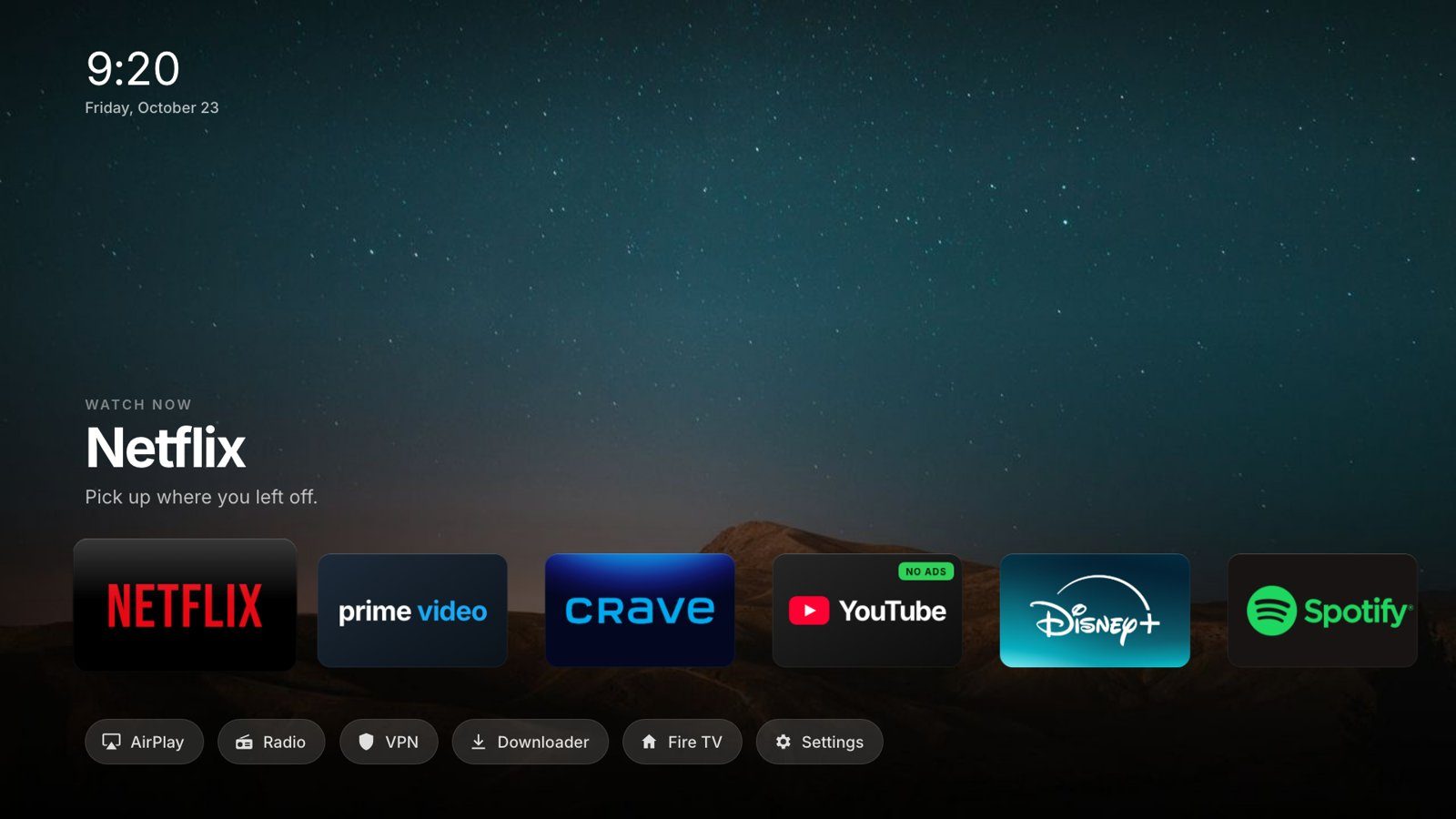
Build me a super minimal, Apple TV style home screen for this Fire TV. Research Apple TV / tvOS design first so it looks incredible and flows nicely. One row of big app tiles: [Netflix, Prime Video, Crave, YouTube (SmartTube), Disney+, Spotify]. A row of small pills under it: [AirPlay, Settings, and the original Fire TV home]. A full-screen background photo that changes with the app I'm on, a clock, the app name and one short line about it. Build it as an HTML page I can preview on my computer with the arrow keys first. Then wrap it in an Android WebView launcher app, handle the remote's D-pad natively, and make the Home button on the remote come back to it. Show me the preview before you install anything.
07
Push back until you love it
This is close to word for word what I typed. My first version was fine; the one in the video came after pushing back.
I don't approve. Add [the apps I forgot]. Add some background photos. Make it super minimal and like Apple TV. Do some research on minimal designs, something that looks really incredible and flows nicely. Then show me the preview on the actual TV.
08
The huge audit (plus radio and sounds)
Fire TV sticks are weak. This is where it got smooth: Claude tests every button with the real remote.
Do a huge audit on everything. Use the real remote over ADB to open every tile, press Home after each one, and make sure it comes back to our home screen. Make it clean and even faster: this stick is weak, so check idle CPU and scroll smoothness on the TV and fix anything heavy. Then add a radio so someone can play music (official station streams for [YOUR CITY] plus a few internet stations), and a soft sound when you scroll.
09
Save it all as a skill
From now on, changing your TV is one sentence.
Turn everything we just did into a skill called /smarttv so next time I can just say "add [app] to my TV home screen", "change the background", or "put the TV back to stock". Include every gotcha we hit so it never happens again.
Shortcut
Skip the build. Use my skill.
My finished /smarttv skill for Claude Code, with every lesson from my build baked in. Paste this in the Terminal, then open the file and put your TV's IP in it.
mkdir -p ~/.claude/skills/smarttv && curl -fsSL https://aidanholt.ca/guides/smart-tv-skill.md -o ~/.claude/skills/smarttv/SKILL.md
Then changing your TV is one sentence:
/smarttv add Plex to the home screen, next to Netflix
/smarttv change the Netflix background to something darker
/smarttv put my TV back to stock
The gotchas (skip my mistakes)
- Home button stopped coming back after an update? Reinstalling the home app silently turns its accessibility service off. Tell Claude: "re-enable the Home button service".
- Never force stop the home app. Android removes it from accessibility when you do. Same fix as above.
- Laggy? Blur effects, animated shadows and slow-zoom backgrounds kill a Fire stick. Ask Claude to only animate transform and opacity and bake the dark gradient into the photos.
- YouTube slow the first time? SmartTube takes a few seconds on first launch. Mine "didn't work", then it did.
- Wrong app version? Most Fire sticks are 32-bit. Claude checks this in prompt 1; make sure it uses it.
Undo everything
Only install apps from the Amazon Appstore or an app's official GitHub. When you're done, you can switch ADB debugging back off.
Run restore_stock.sh and put my TV back exactly how Amazon shipped it.
Questions
Can Claude Code control a Fire TV?
Yes. Turn on ADB debugging in the Fire TV's Developer Options, give Claude Code the TV's IP address, and it connects over your Wi-Fi with ADB to install apps, change settings and build a custom home screen.
Does this remove all ads on Fire TV?
It removes the ads and promos on the home screen (7 to 0 on mine). Ads inside Prime Video, Netflix or Crave ad tiers are part of the stream and stay. SmartTube removes YouTube ads.
Is it safe, and can I undo it?
Amazon apps are disabled, never uninstalled, and apps come only from the Amazon Appstore or an app's official GitHub. One prompt runs restore_stock.sh and puts the TV back to stock. You can turn ADB debugging off when you're done.
Does it work on Google TV or Android TV?
The same approach works: Developer Options are under Settings > System > About (press Build 7 times). I built and tested mine on a Fire TV Stick 4K Max (2nd gen) on Fire OS 8.
Do I need to know how to code?
No. You paste the 7 prompts in order and answer Claude's questions. You do need Claude Code, which comes with a paid Claude plan.
Does it make the Fire TV faster?
Scrolling got smoother (81% of frames dropped on Amazon's home vs about 25% on the new one, measured with dumpsys gfxinfo). Free memory barely changed, because Android fills it back up.
Stay in touch (optional)
Get my next free skill when it drops.
Built and tested on a Fire TV Stick 4K Max (2nd gen), Fire OS 8, October 2026. Not affiliated with Amazon, Apple or Anthropic. Everything here is reversible.